
How to Save Your Vastu Report as a PDF and Share It

By Deesha · Reviewed by Editor, VastuScan
22 October 2026 · 2 min read
Every VastuScan report can be saved as a PDF and shared with whoever helps you decide: family, your architect, an interior designer or the builder's sales team. It takes two taps and costs nothing.
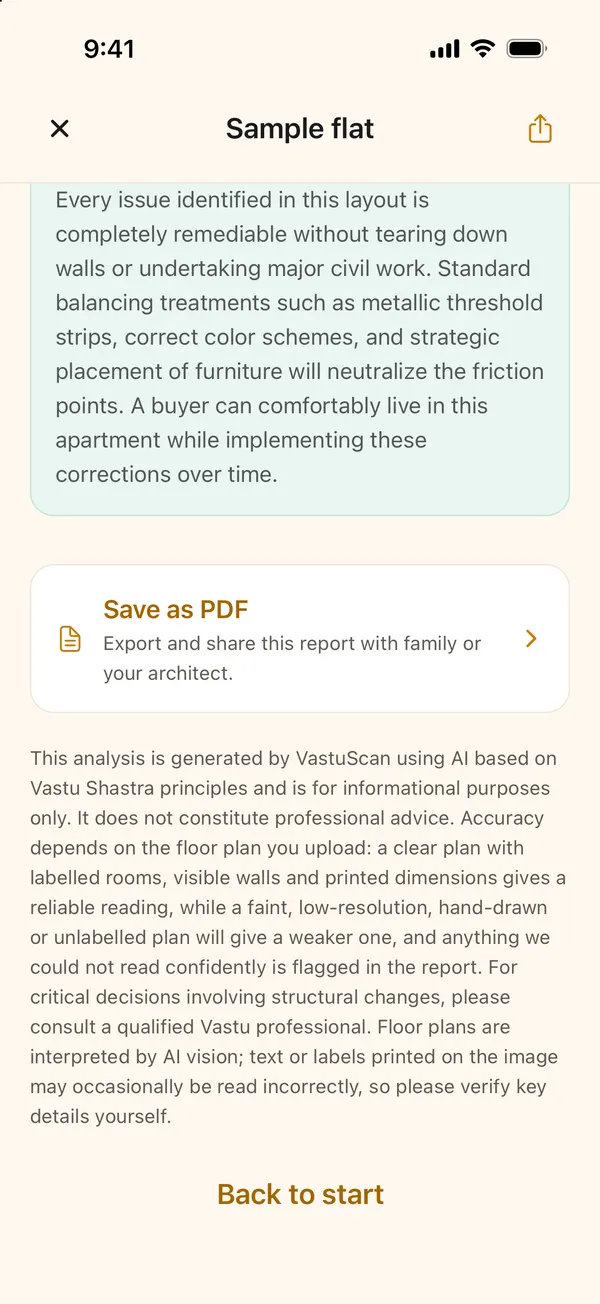
Step 1: Open the report and scroll to the end
Open the property from the Properties tab, scroll to the bottom of the report, and tap Save as PDF.
Step 2: Choose where it goes
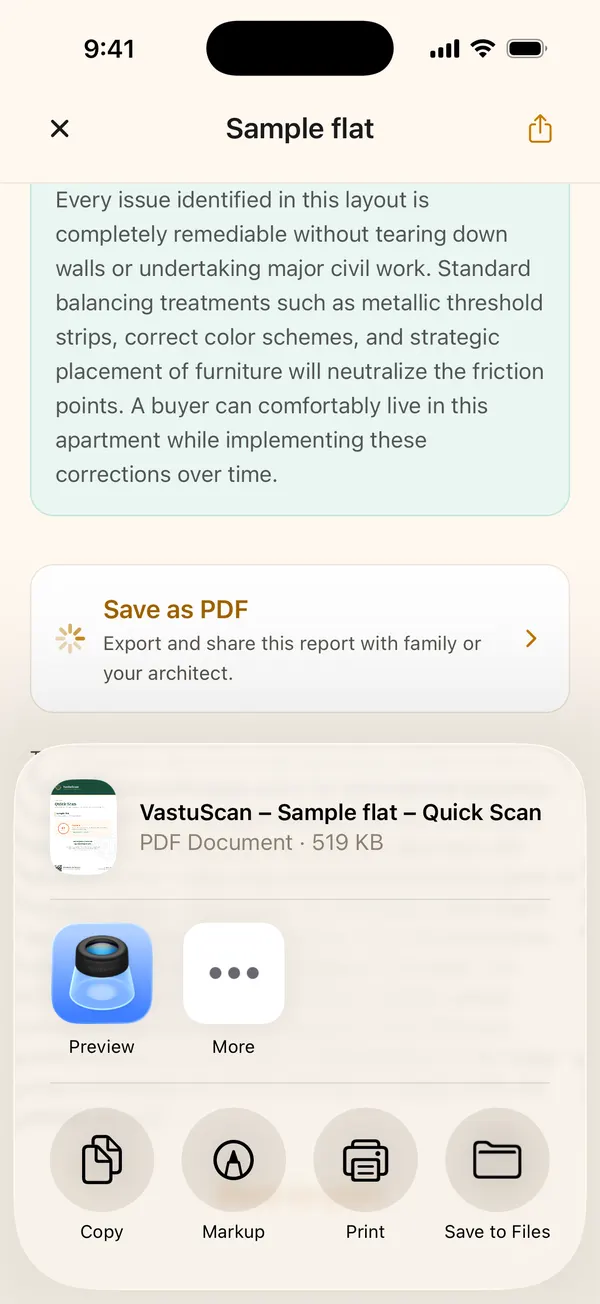
Your phone's share sheet opens with the PDF ready, named after the property and the type of report. Send it on WhatsApp or by email, Save to Files to keep a copy, or Print it. The apps listed depend on what is installed on your phone.
What the PDF looks like
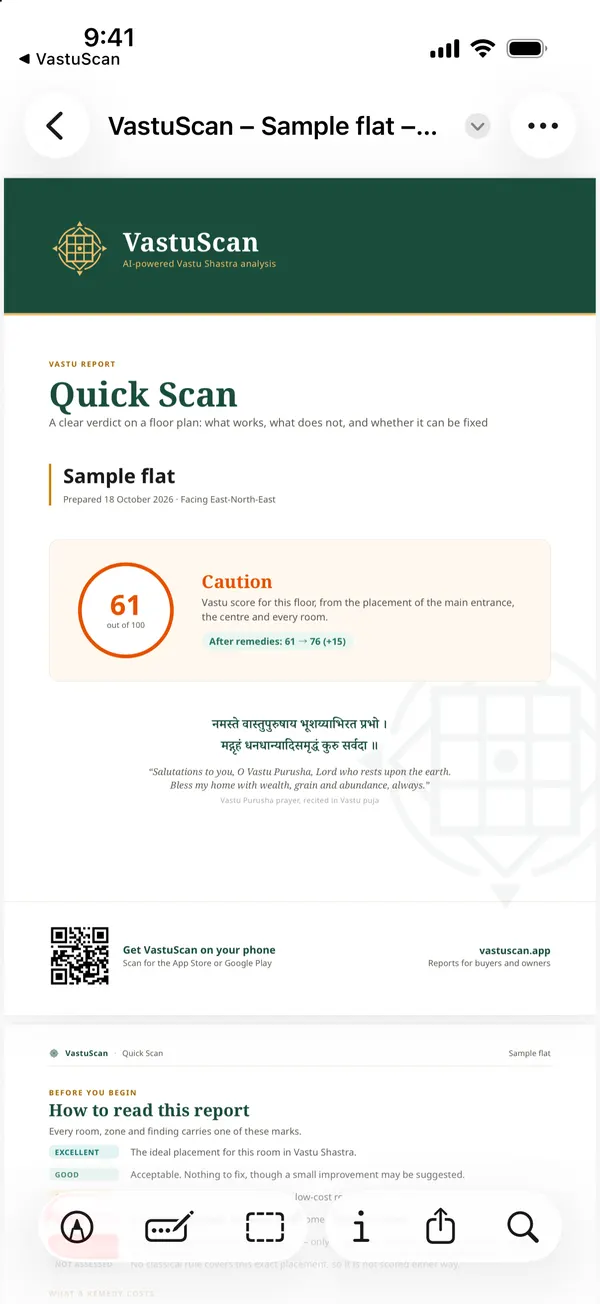
The PDF opens with a cover page showing the property, the date, the facing, the Vastu score, the verdict and the score after remedies. The next page explains the grade marks, and the rest follows the report you see in the app.
What to point each person to
A Vastu report means different things to different readers. When you send it, say which part you want them to look at:
- Family deciding with you: the verdict on the first page, and whether any defect is Critical. That is the part that decides yes or no.
- Your architect or interior designer: the rooms marked Concern and their remedies. Many remedies are about where furniture, the stove or the bed goes, which is exactly their job.
- The builder's sales team: the main door and any room in the wrong zone. If another unit in the same tower has the mirror-image plan or a different door position, ask whether it is available.
- A Vastu consultant, if you use one: the whole report. It gives them the plan reading, the north direction and the grades in one place, so their visit can start from there.
Before you share: what the PDF shows
The PDF carries the property name you typed, the builder and project if you entered them, and the date. If you are sharing it widely, for example in a society WhatsApp group, check the name first; "Flat 2" is fine, "Sunrise Towers B-704, Sharma" may say more than you meant.
Tips for sharing
- Name the property clearly before you scan ("Sunrise Towers B-704", not "flat 2"). The PDF's file name comes from it.
- Send the architect the Full Report. Its zone-by-zone pages and ranked remedies give them more to work with. See how to read the Full Report.
- Comparing flats with family? Share each flat's PDF, or show them the side-by-side view: how to compare flats.
Questions people ask
Does the PDF cost anything?
No. Saving a report as a PDF is free, including for your first free scan.
What does the PDF contain?
The same report you see in the app: the score and verdict, the score after remedies, a page on how to read the report, every room or zone with its grade, and the remedies, under a VastuScan cover page.
Can the person I send it to open it without the app?
Yes. It is an ordinary PDF that opens on any phone or computer. The cover has a QR code if they want the app too.
Written with AI by Deesha, VastuScan’s AI Vastu guide, and checked against VastuScan’s published Vastu rules. Vastu Shastra is a traditional system; this is guidance, not architectural, structural or financial advice, and no outcome is promised.
Read next
Vastu apps & tools
Detailed Vastu Report of a House: How to Read the Full Report
What VastuScan's Full Report adds over a Quick Scan, how to run one, and how to read each section, from the entrance pada to the remedies worth doing first.
Vastu apps & tools
How to Compare Two or Three Flats for Vastu in VastuScan
Shortlisted a few flats? Compare their Vastu side by side in VastuScan: scores, verdicts, good points and issues. A step-by-step guide with screenshots.
Vastu apps & tools
How to Use Compass Check: Vastu Without a Floor Plan, Step by Step
No floor plan? Compass Check maps each room with your phone's compass. A step-by-step guide with real screenshots, from standing at the centre to the report.
Vastu apps & tools
How to Use Quick Scan: Check a Floor Plan in VastuScan, Step by Step
A step-by-step guide to VastuScan's Quick Scan, with real screenshots: name the home, upload the plan, crop it, set the centre and north, and read the report.